September 30: LEMON manuals is back up on a temporary server! Slowness is possible
System Operation Check Mode: Operation: Notes
- Prepare the Subaru Select Monitor kit. < Refer to
PREPARATION TOOL , General Description. >
 Courtesy of SUBARU OF AMERICA, INC.
- Prepare PC with Subaru Select Monitor installed.
- Connect the USB cable to SDI (Subaru Diagnosis Interface) and USB port on the personal computer (dedicated port for the Subaru Select Monitor).
NOTE:
The dedicated port for the Subaru Select Monitor means the USB port which was used to install the Subaru Select Monitor.
- Connect the diagnosis cable to SDI.
- Connect SDI to data link connector located in the lower portion of the instrument panel (on the driver's side).
CAUTION:
Do not connect the scan tools except for Subaru Select Monitor and general scan tool.
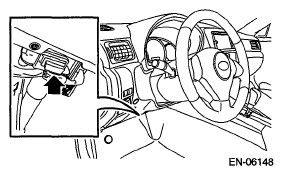 Courtesy of SUBARU OF AMERICA, INC.
- Start the PC.
- Turn the ignition switch to ON (engine OFF) and run the "PC application for Subaru Select Monitor".
- On «Main Menu» display, select {Each System Check}.
- On «System Selection Menu» display, select {Engine Control System}.
- Click the [OK] button after the information of engine type has been displayed.
- On «Engine Diagnosis» display, select {System Operation Check Mode}.
- The following items are displayed on the monitor.
| Display |
| Actuator ON/OFF Operation |
| Immobilizer System |
| Fuel Pump Control |
| Fixed Idle Ignition Timing |
| Idle Speed Control |
| Injector Control |
| EGR Valve Control |