October 30: LEMON manuals on a temporary server, it is slow and having issues, download the manuals you need! Later in November we will switch back to the fast server.
Module - Restraint Control - Remove And Replace: Install
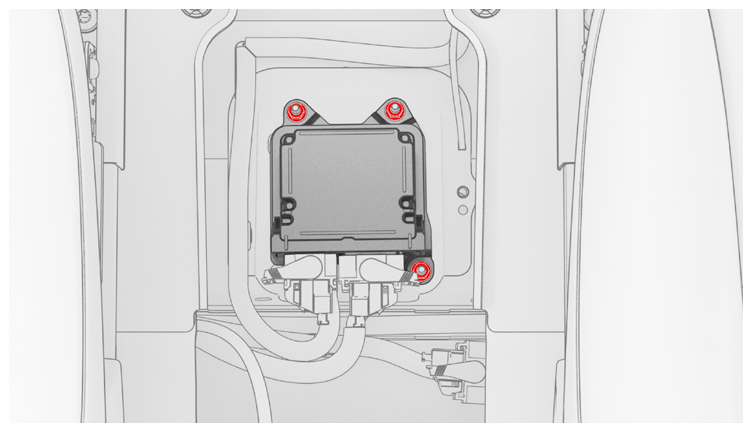
- Position the restraint control module in the vehicle, and then install new nuts (x3) to attach the module to the vehicle.
 8 N.m (5.9 ft-lbs)
NOTE:
Use of the following tool(s) is recommended:
- 10 mm socket
- 2 in extension
- 1/4 in std ratchet
- 1/4 in torque wrench (installation only)
 Courtesy of TESLA, INC. Courtesy of TESLA, INC.
|
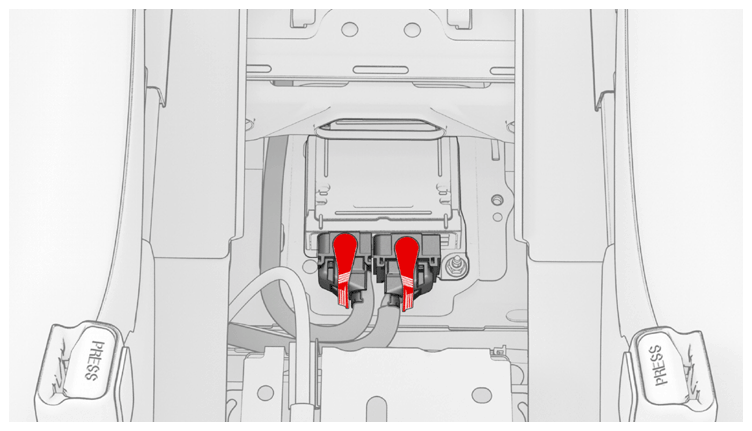
- Connect the electrical harness connectors (x2) to the restraint control module, and then engage the locking levers.
CAUTION:
Perform a push-pull test on both connectors before proceeding.
 Courtesy of TESLA, INC. Courtesy of TESLA, INC.
|
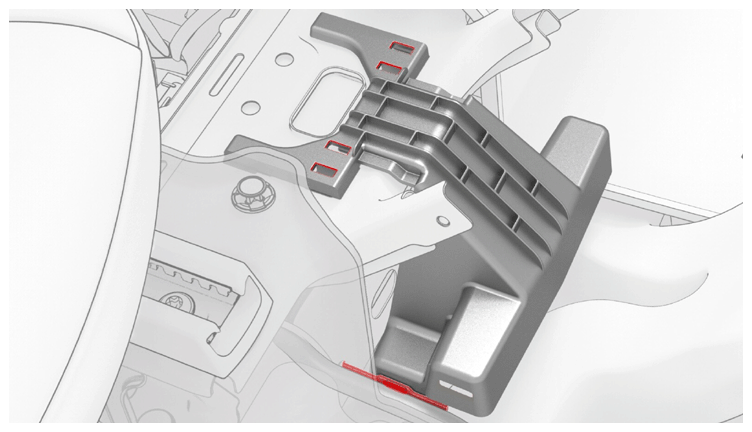
- Position the center console support bracket on the vehicle, slide the bracket rearward, and then install the harness clip (x1) and tabs (x4) that attach the bracket to the vehicle.
 Courtesy of TESLA, INC. Courtesy of TESLA, INC.
|
- Install the center console. See Center Console (Remove and Install)
.
- Park the vehicle on a level surface.
- Connect a laptop with Toolbox 3 to the vehicle. Reinstall the vehicle firmware. See Software Reinstall - Touchscreen
.
- Perform the appropriate firmware operation based on the installed firmware version:
- In Toolbox, run the "PROC_RCM_X_BOL-CONFIGURATION' routine.
- In Toolbox, search for "PROC_RCM_X_SERVICE-TASKS", and then Run
the routine.
- When the routine has finished, disconnect the laptop from the vehicle.