2000 Avalon
- Stand about 4 feet from outside driver's door handle. Point remote transmitter toward vehicle. Press one remote transmitter button for about one second. If doors lock and unlock, system is okay. If doors do not lock and unlock, go to next step.
- Replace remote transmitter battery and repeat step 1. If keyless entry operates and remote transmitter LED illuminates more than once, system is okay. If keyless entry does not operate, see DIAGNOSTIC TESTS .
- If buzzer chirps as specified, but remote keyless entry does not function, go to next step. If buzzer does not chirp as specified, see WIRELESS DOOR LOCK BUZZER under COMPONENT TESTS.
- Connect ohmmeter between ground and terminal No. 17 (Red/Yellow wire) at MPX body control ECU 25-pin harness connector. If continuity is present when key is inserted into ignition switch, go to next step. If continuity is not present when key is inserted into ignition switch, replace key unlock warning switch which is integral with ignition switch. See WIRING DIAGRAMS .
- If buzzer chirps as specified and operating range of remote transmitter was okay in step 1, system is okay. If buzzer chirps as specified but operating range of remote transmitter was not okay in step 1, test system using a known-good remote transmitter. If system is still inoperable, see
BODY CONTROL SYSTEMS - AVALON article.
- Connect a jumper wire between terminals E1 and TC of Data Link Connector (DLC) No. 1. See Fig 1. See if open door indicator light flashes on and off for .5 seconds 4 times with a 1.5 second gap, and flashes on and off for .5 seconds 2 times, for a code 42. If code 42 is output, repair short in Blue/White wire between terminal No. 21 at MPX body control ECU harness 25-pin connector and terminal No. 2 at wireless door lock receiver. If code 42 is not output, go to next step. See WIRING DIAGRAMS .
- When not transmitting, backprobe terminal No. 2 (Blue/White wire) at wireless door lock receiver. If 10-14 volts exist, go to next step. If 10-14 volts do not exist, repair open in Blue/White wire between terminal No. 21 at MPX body control ECU harness 25-pin connector and terminal No. 2 at wireless door lock receiver.
- Put vehicle in initialized condition by ensuring key has not been inserted in ignition key cylinder and all doors are closed and locked. Measure voltage between ground and terminal No. 3 (Green/Red wire) at wireless door lock receiver. Voltage should be 4.5-5.5 volts, and drop to zero volts when receiving a signal from remote transmitter. If voltage is as specified, go to next step. If voltage is not as specified, repair open circuit in Green/Red wire between terminal No. 7 at MPX body control ECU and terminal No. 3 at wireless door lock receiver. See WIRING DIAGRAMS .
- Measure voltage at terminal No. 5 (Purple/Blue wire) at wireless door lock receiver harness connector. If 10-14 volts exists, go to next step. If 10-14 volts do not exist, replace DOME (7.5-amp) fuse located at instrument panel fuse box located at lower left side of dashboard. If fuse is okay, check if fuse is receiving 10-14 volts, if DOME fuse is not receiving 10-14 volts, repair power distribution to DOME fuse. See WIRING DIAGRAMS . If DOME fuse is receiving 10-14 volts, repair open in Purple/Blue wire between DOME fuse and terminal No. 5 at wireless door lock receiver harness connector.
- Check continuity in White/Black wire between terminal No. 1 at wireless door lock receiver and ground at passenger side kick panel. If continuity is present, replace wireless door lock receiver. If continuity is not present, repair open circuit in White/Black wire.
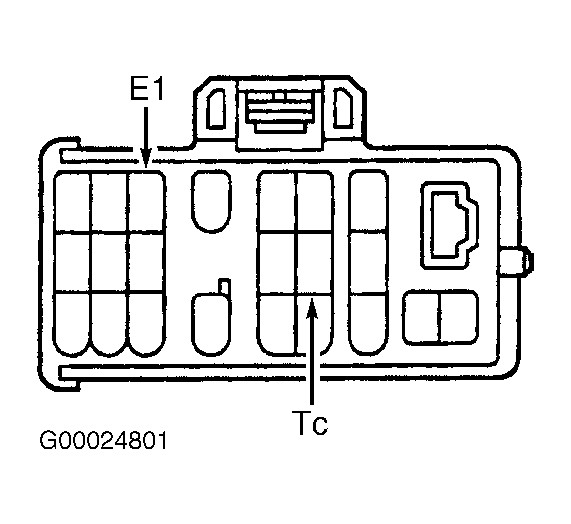 Courtesy of © TOYOTA, LICENSE AGREEMENT TMS1002