Door Multiplex Control Unit
- Remove driver's door trim panel enough to gain access to door multiplex control unit connector. Turn ignition off. Disconnect door multiplex control unit Blue 20-pin connector. See Fig 1
. Ensure connector terminals are okay and making proper contact. Repair connector terminals as necessary and retest system. If connector terminals are okay, go to next step.
- Using a voltmeter, probe between door multiplex control unit Blue 20-pin connector terminal No. 1 (White/Yellow wire) and ground. See Fig 1
. See DOOR MULTIPLEX CONTROL UNIT CONNECTOR TERMINAL IDENTIFICATION
table. If battery voltage exists, go to next step. If battery voltage does not exist, check fuse No. 56 (7.5-amp), located in fuse/relay box, in engine compartment. If fuse is okay, check for open in White/Yellow wire. See WIRING DIAGRAMS
. Repair as necessary and retest system.
- Ensure ignition switch is in OFF position. Using an ohmmeter, probe between door multiplex control unit Blue 20-pin connector terminals No. 12 (Black wire) and No. 19 (Black wire) and ground. If continuity exists, go to next step. If continuity does not exist, check for an open in Black wire and/or bad ground connection. Repair as necessary and retest system.
- Ensure ignition switch is in OFF position. Reconnect door multiplex control unit Blue 20-pin connector. Using a voltmeter, backprobe between Blue 20-pin connector terminal No. 5 (Green/Blue wire) and ground. Open and close driver's door and measure voltage. In closed position, voltage should be 5 volts or more. In open position, voltage should be less than one volt. If voltage is as specified, go to next step. If voltage is not as specified, check driver's door switch. See Figure
. See DOOR LOCKS - POWER & TRUNK RELEASE article in the ACCESSORIES/SAFETY EQUIPMENT section. If door switch is okay, check ground connections or for an open in Green/Blue wire. Refer to the WIRING DIAGRAMS
. Repair as necessary and retest system.
- Using a voltmeter, backprobe between Blue 20-pin connector terminal No. 6 (Green/White wire) and ground. Turn driver's door key cylinder to LOCK and NEUTRAL positions and measure voltage. In NEUTRAL position, voltage should be 5 volts or more. In LOCK position, voltage should be less than one volt. If voltage is as specified, go to next step. If voltage is not as specified, check driver's door key cylinder switch. See DOOR LOCKS - POWER & TRUNK RELEASE article in the ACCESSORIES/SAFETY EQUIPMENT section. If door switch is okay, check ground connections or for an open in Green/White wire. Refer to the WIRING DIAGRAMS
. Repair as necessary and retest system.
- Using a voltmeter, backprobe between Blue 20-pin connector terminal No. 16 (Green/Red wire) and ground. Turn driver's door key cylinder to UNLOCK and NEUTRAL positions and measure voltage. In NEUTRAL position, voltage should be 5 volts or more. In UNLOCK position, voltage should be less than one volt. If voltage is as specified, go to next step. If voltage is not as specified, check driver's door key cylinder switch. See DOOR LOCKS - POWER & TRUNK RELEASE article in the ACCESSORIES/SAFETY EQUIPMENT section. If door switch is okay, check ground connections or for an open in Green/Red wire. See WIRING DIAGRAMS
. Repair as necessary and retest system.
- Using a voltmeter, backprobe between Blue 20-pin connector terminal No. 7 (Blue/White wire) and ground. Lock and unlock driver's door lock knob and measure voltage. In UNLOCK position, voltage should be 5 volts or more. In LOCK position, voltage should be less than one volt. If voltage is as specified, go to next step. If voltage is not as specified, check driver's door lock knob switch. See DOOR LOCKS - POWER & TRUNK RELEASE article in the ACCESSORIES/SAFETY EQUIPMENT section. If door switch is okay, check ground connections or for an open in Blue/White wire. See WIRING DIAGRAMS
. Repair as necessary and retest system.
- Using a voltmeter, backprobe between Blue 20-pin connector terminal No. 17 (Green/Black wire) and ground. Lock and unlock driver's door lock knob and measure voltage. In LOCK position, voltage should be 5 volts or more. In UNLOCK position, voltage should be less than one volt. If voltage is as specified, replace door multiplex control unit (incorporated into power window master switch). If voltage is not as specified, check driver's door lock knob switch. See DOOR LOCKS - POWER & TRUNK RELEASE article in the ACCESSORIES/SAFETY EQUIPMENT section. If door switch is okay, check ground connections or for an open in Green/Black wire. See WIRING DIAGRAMS
. Repair as necessary and retest system.
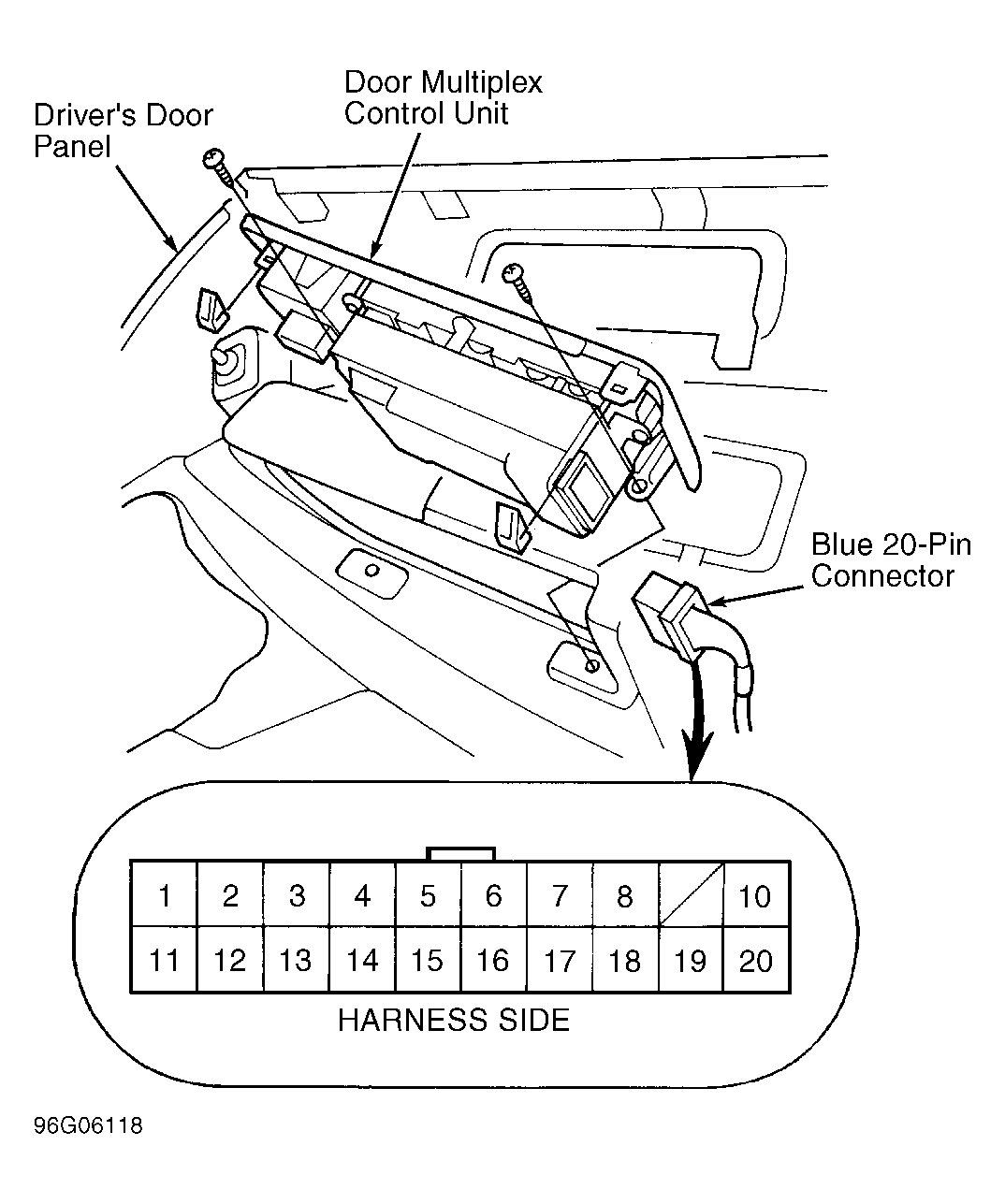 Courtesy of AMERICA HONDA MOTOR CO., INC.
 DOOR MULTIPLEX CONTROL UNIT CONNECTOR TERMINAL IDENTIFICATION
| Terminal No. (Wire Color) |
Circuit |
| 1 (WHT/YEL) |
Battery Voltage Input |
| 2 (GRN/WHT) |
Power Window Relay Input |
| 3 (RED/BLK) |
Master Switch Light - Power |
| 4 (BLU) |
Window Motor Pulse Input |
| 5 (GRN/BLU) |
Door Switch Input |
| 6 (GRN/WHT) |
Key Cylinder Switch UNLOCK |
| 7 (BLU/WHT) |
Knob Switch LOCK |
| 8 (GRN/RED) |
Lock Switch UNLOCK |
| 10 (RED/BLU) |
Window Motor Control |
| 11 (RED/YEL) |
Window Motor Control |
| 12 (BLK) |
Ground |
| 13 (RED) |
Master Switch Light GROUND |
| 14 (BLU/BLK) |
Trunk Opener Switch Input |
| 15 (BRN/YEL) |
Door "D" Line |
| 16 (GRN/RED) |
Key Cylinder Switch LOCK |
| 17 (GRN/BLK) |
Knob Switch UNLOCK |
| 18 (GRN/WHT) |
Lock Switch LOCK |
| 19 (BLK) |
Ground |
| 20 (GRY/BLK) |
Main Switch Output |