Rearview Camera Inputs and Outputs
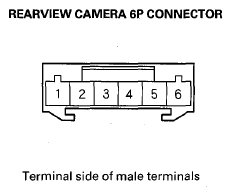 Courtesy of AMERICAN HONDA MOTOR CO., INC.
 REARVIEW CAMERA 6P CONNECTOR
| Terminal Number |
Wire Color |
Terminal Name |
Description |
Voltage (about) |
Symptom |
| 1 |
BLK |
CAMERA VIDEO (NTSC signal) |
Video signal for rearview camera |
1V AC |
If open: No change to rearview camera image. If short to ground: No change to rearview camera image. |
| 2 |
GRY |
CAMERA SH (Camera shield) |
Shield for terminals No. 1, 3, 4, 5, 6 |
0V |
If open: No rearview camera image. If short to ground: No change to rearview camera image. |
| 3 |
YEL |
CAMERA ADAPT (Adaptive camera) |
Control signal for rearview camera |
0 V |
If open: No change to rearview camera image. If short to ground: No change to rearview camera image. |
| 4 |
GRN |
CAMERA BIT 1 (Mode select signal) |
Mode select signal for rearview camera |
Top down view. 8V |
If open: No change to rearview camera image. If short to ground: No change to rearview camera image. |
| 5 |
RED |
CAMERA BIT 0 (Mode select signal) |
Mode select signal for rearview camera |
Normal view: 8V |
If open: No change to rearview camera image. If short to ground: No change to rearview camera image. |
| 6 |
WHT |
CAMERA VCC (VCC supply) |
Power source for rearview camera |
8V |
If open: When put into reverse, the navigation screen goes black (backlight still operation). If short to ground: When put into reverse, the navigation screen goes black (backlight still operative). |