September 30: LEMON manuals is back up on a temporary server! Slowness is possible
Keyless Entry System Inoperative
- Test power door lock function by operating system with buttons on door switches. If doors locks operate properly, go to next step. If door locks do not operate properly, see appropriate POWER DOOR LOCKS article.
- Resynchronize all transmitters. See TRANSMITTER RESYNCHRONIZATION
under PROGRAMMING. If door locks cycle while resynchronizing transmitters, go to step 4
. If door locks do not cycle while resynchronizing transmitter, go to next step.
- Replace transmitter batteries. Resynchronize transmitter. See TRANSMITTER RESYNCHRONIZATION
under PROGRAMMING. If door locks cycle during resynchronization of transmitters, go to next step. If door locks did not cycle during resynchronization of transmitters, go to step 6
.
- Test keyless entry system using transmitters. If keyless entry system operates, system okay. If keyless entry system does not operate, go to next step.
- Reprogram all transmitters. See TRANSMITTER PROGRAMMING
under PROGRAMMING. Test keyless entry system using transmitter. If keyless entry system operates normally, system okay. If keyless entry system does not operate normally, go to next step.
- Program known good transmitter. See TRANSMITTER PROGRAMMING
under PROGRAMMING. Using transmitter, test keyless entry system operation. If keyless entry system works properly, go to next step. If keyless entry system does not work properly, go to step 8
.
- Replace defective transmitter. Reprogram all transmitters. See TRANSMITTER PROGRAMMING
under PROGRAMMING. Verify system operation.
- Disconnect remote control door lock receiver (RCDLR) Black 16-pin connector. Using test light, backprobe RCDLR connector terminal "E" (Red/White wire) and ground, and then between terminal "P" (Red/White wire) and ground. See Fig 1
. If test light is on for both tests, go to next step. If test light is off for one or both tests, go to step 12
.
- Using test light, backprobe between RCDLR connector terminal "E" (Red/White wire) and terminal "N" (Black wire). See Fig 1
. If test light illuminates, go to next step. If test light does not illuminate, go to step 11
.
- Check for poor connection at RCDLR. If okay, replace RCDLR. See REMOTE CONTROL DOOR LOCK RECEIVER
under REMOVAL & INSTALLATION. Verify system operation.
- Repair poor connection or open in Black wire between RCDLR and ground. Verify system operation.
- Repair poor connection or open in Red/White wire between RCDLR and junction block. Verify system operation.
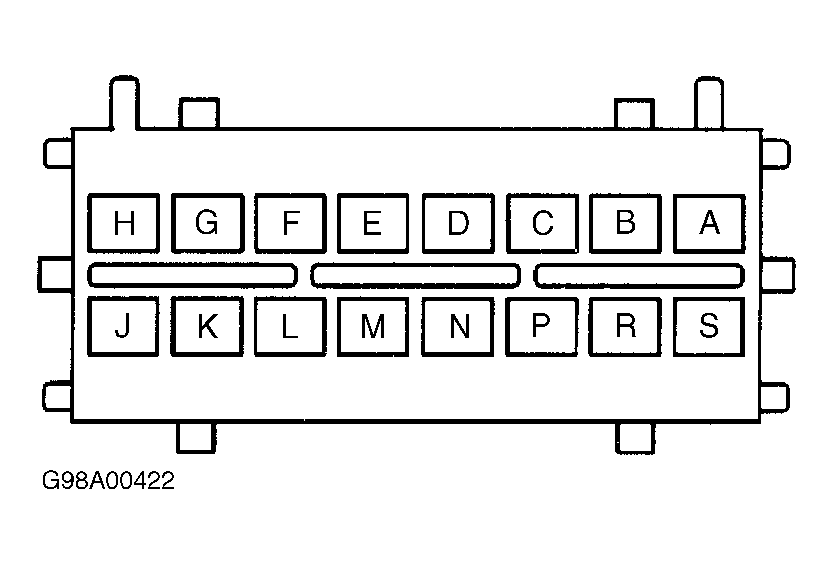 Courtesy of GENERAL MOTORS CORP.