Power Window Switch
- Check power window system circuit breaker No. 28 (25A). See CIRCUIT BREAKER
. If circuit breaker is okay, go to next step. If circuit breaker is not okay, replace circuit breaker.
- Turn the ignition switch to the ON position. Check for battery voltage at the circuit breaker in the instrument panel junction block. If battery voltage exists, turn the ignition switch to the OFF position, then go to next step. If battery voltage does not exist, repair circuit between Power Distribution Center (PDC) and the instrument panel junction block as necessary. See POWER DISTRIBUTION
in SYSTEM WIRING DIAGRAMS article in ELECTRICAL.
- Disconnect and isolate the negative battery cable. Remove inoperative power window switch from door trim panel. See POWER WINDOW SWITCH
under REMOVAL & INSTALLATION. Disconnect power window switch harness connector.
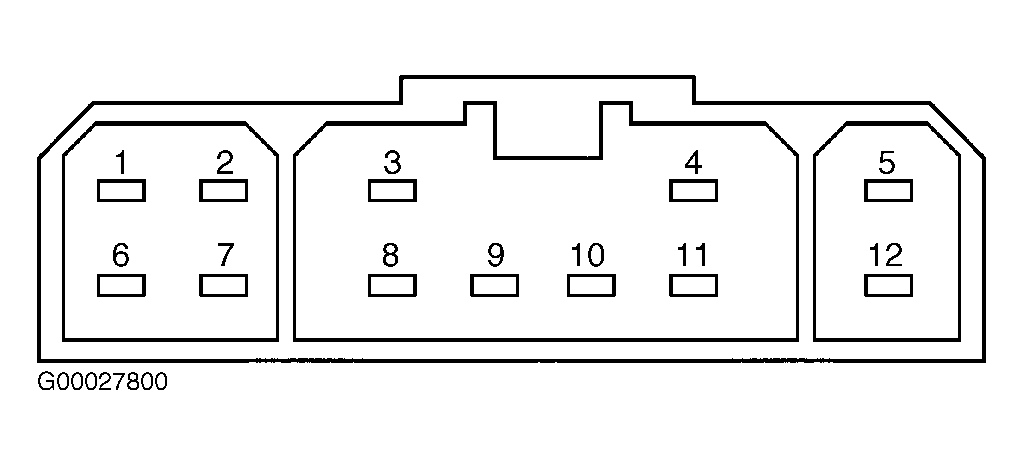
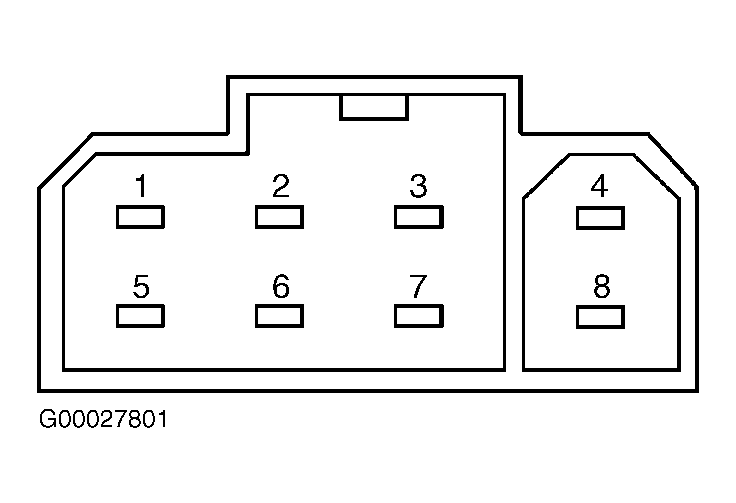
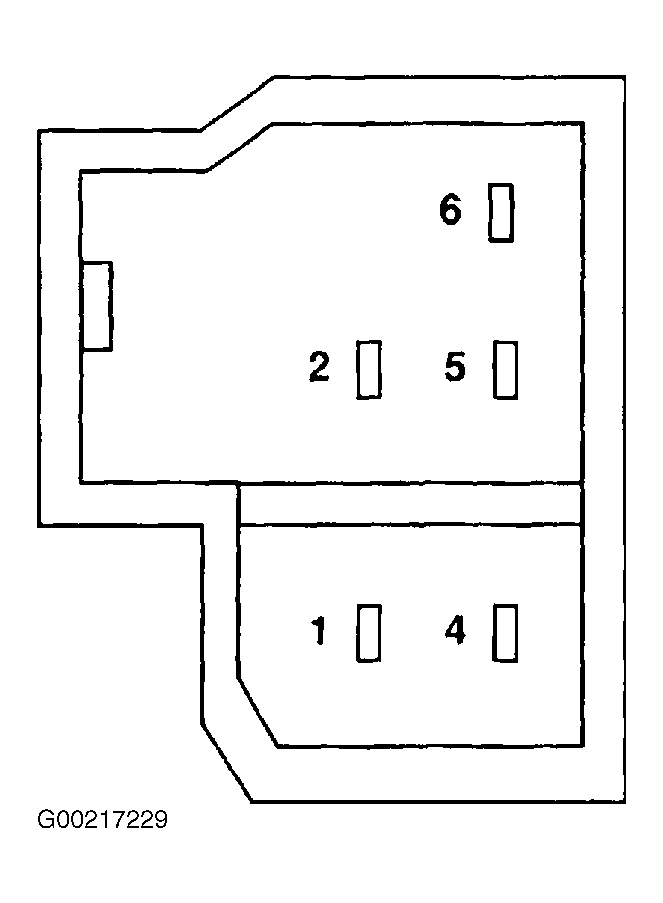
- Check for continuity between appropriate terminals of power window switch (component side). See DRIVER DOOR MODULE CONTINUITY
or PASSENGER POWER WINDOW SWITCH CONTINUITY
table. See Fig 1
, Fig 2
or Fig 3
. If continuity is as specified, check suspect power window motor. See POWER WINDOW MOTOR
. If continuity is not as specified, replace power window switch.
DRIVER DOOR MODULE CONTINUITY
| Switch Position |
Continuity Between Terminals No. |
| Off |
1 & 8; 2 & 8; 3 & 8; 4 & 8; 5 & 8; 6 & 8; 8 & 10; 8 & 12 |
| Up |
| Left Front |
5 & 9 |
| Right Front |
3 & 9 |
| Left Rear |
4 & 9 |
| Right Rear |
2 & 9 |
| Down |
| Left Front |
9 & 12 |
| Right Front |
6 & 9 |
| Left Rear |
9 & 10 |
| Right Rear |
1 & 9 |
| Power Window Lock-Out |
|
PASSENGER POWER WINDOW SWITCH CONTINUITY
| Switch Position |
Continuity Between Terminals No. |
| Off |
1 & 4; 2 & 5 |
| Up |
| Right Front |
5 & 6 |
| Left & Right Rear |
1 & 6 |
| Down |
| Right Front |
1 & 6 |
| Left & Right Rear |
5 & 6 |
 Courtesy of DAIMLERCHRYSLER CORPORATION
 Courtesy of DAIMLERCHRYSLER CORPORATION
 Courtesy of DAIMLERCHRYSLER CORPORATION