Accessory Protocol Interface Module (APIM)
Accessory Protocol Interface Module (APIM)
Removal and Installation
All vehicles
1. NOTE: It is necessary to record the current Accessory Protocol Interface Module (APIM) software and hardware level when a new APIM is being installed to make sure that the new component is the same version as the component being replaced.
Retrieve and record the current APIM software and hardware level. For additional information, refer to Accessory Protocol Interface Module (APIM) Software Level Check Accessory Protocol Interface Module (APIM) Software Level Check.
Vehicles without navigation
2. Remove the Front Display Interface Module (FDIM). For additional information, refer to Front Display Interface Module (FDIM) Front Display Interface Module (FDIM).
Vehicles with navigation
3. Remove the instrument panel upper bin.
1. Remove the rubber mat.
2. Remove the 2 screws.
3. Remove the instrument panel upper bin.
All vehicles
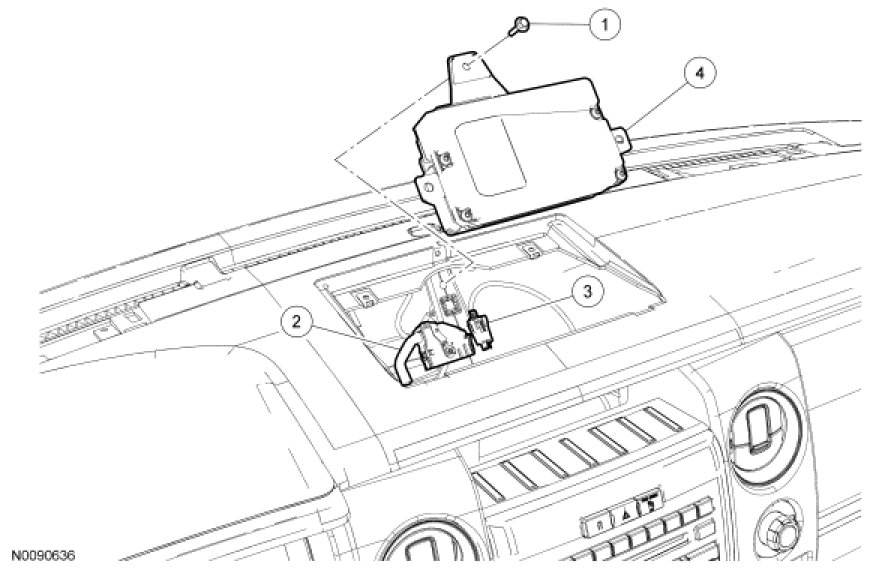
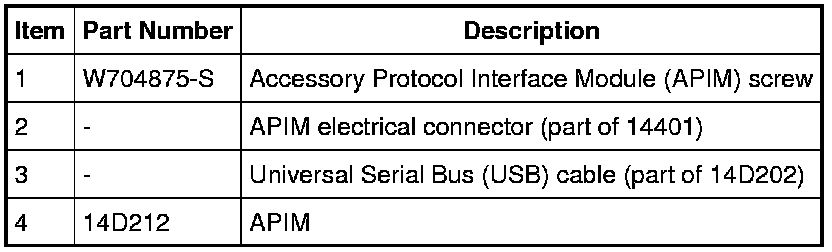
4. Remove the APIM screw and position the APIM upward.
5. Remove the APIM.
- Disconnect the electrical connector and the Universal Serial Bus (USB) cable.
6. To install, reverse the removal procedure.
- If a new APIM is being installed, program the APIM to the correct software level. For additional information, refer to Information Bus.