How to Update the PCM
How to Update the PCMNOTE:
^ To ensure the latest program is installed, do a PCM update whenever the PCM is substituted or replaced.
^ You cannot update a PCM with the program it already has. It will only accept a new program.
^ Before you update the PCM, make sure the vehicle's battery is fully charged.
^ To prevent PCM damage, do not operate anything electrical (audio system, brakes, A/C, power windows, moonroof, or door locks) during the update.
^ If you need to diagnose the Honda interface module (HIM) because the HIM's red (#3) light came on or was flashing during the update, leave the ignition switch in the ON (II) position when you disconnect the HIM from the data link connector (DLC). This will prevent PCM damage.
1. Turn the ignition switch ON (II). Do not start the engine.
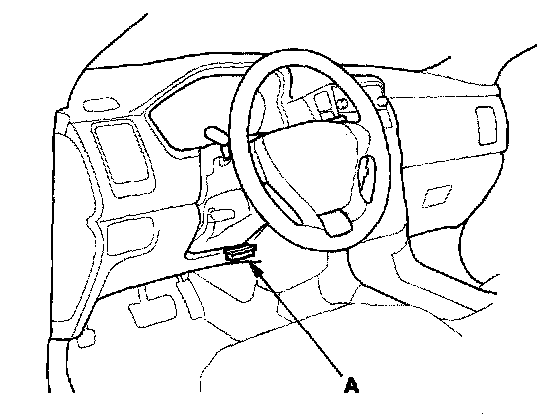
2. Connect the HDS to the DLC (A).
3. Select the INSPECTION MENU with the HDS.
4. Do the TP LEARNING CHECK in the ETCS TEST.
5. If the HDS does not have the update function, disconnect the HDS from the DLC, and connect the Honda interface module (HIM) to the DLC.
6. Do the PCM update procedure as described on the HIM label and in the PCM update system.
7. Do the PCM idle learn procedure.
8. Clear the CKP pattern with the HDS while the engine is stopped.