Tire Pressure Module: Service and Repair
TPMS Control Unit Replacement
NOTE: Make sure the TPMS control unit mounting bracket is not bent or twisted as this may affect its communication with the tire pressure sensors.
1. Turn the ignition switch to LOCK (0).
2. Remove the driver's dashboard lower cover. Drivers Dashboard Lower Cover Removal/Installation
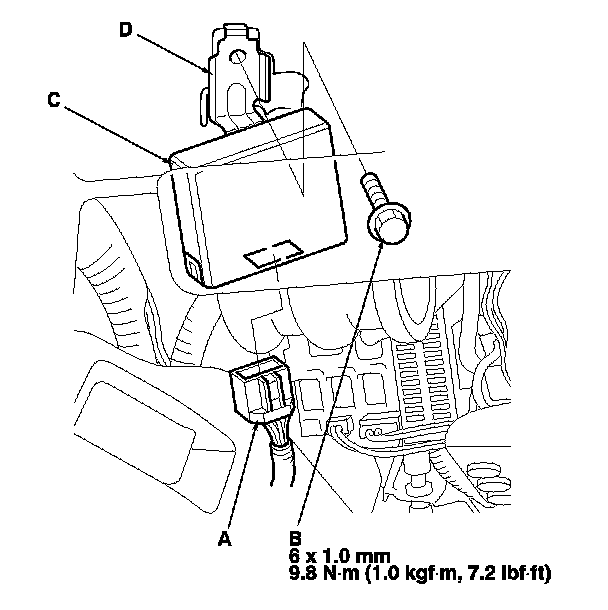
3. Disconnect the TPMS control unit connector (A).
NOTE: The TPMS control unit is located above the hood release handle.
4. Remove the flange bolt (B), and remove the TPMS control unit (C) with the bracket (D).
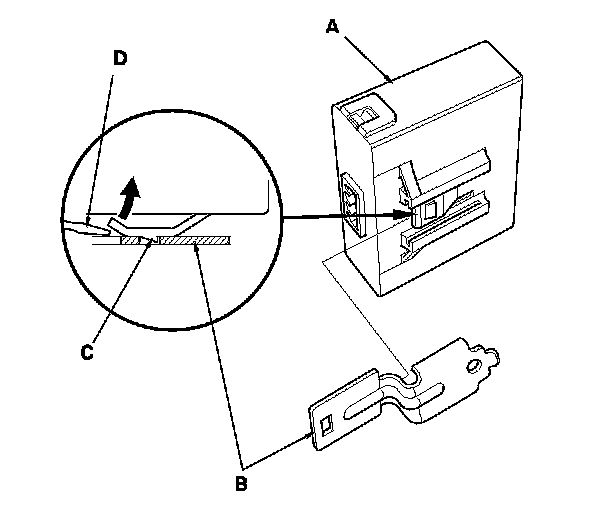
5. Remove the TPMS control unit (A) from the bracket (B).
NOTE: While separating the TPMS control unit from the bracket, release the hook (C) on the TPMS control unit using a flat-tipped screwdriver (D), and push it up to remove the bracket.
6. Install the new TPMS control unit in the reverse order of removal.
NOTE: Make sure the TPMS control unit is properly installed. You will hear a click when the TPMS control unit is securely mounted on the bracket.
7. Connect the HDS, and memorize the tire pressure sensor IDs using the TPMS initializer tool. Testing and Inspection