DRB III Error Messages and Blank Screen
Under normal operation, the DRBIII(R) will display one of only two error messages:- User-Requested WARM Boot or User-Requested COLD Boot
If the DRBIII(R) should display any other error message, record the entire display and call the STAR Center. This is a sample of such an error message display.
- User-Requested WARM Boot by pressing MORE and NO at the same time.
ver: 2.29
date: 1 Oct 93
file: key_itf.cc
date: Jan 12 1994
line: 544
err: 0x1
User-Requested WARM Boot
Press MORE to switch between this display and the application screen. Press F4 when done noting information.
or User-Requested COLD Boot by pressing MORE and YES at the same time.
ver: 2.29
date: 1 Oct 99
file: keyhndi.cc
date: Mar 8 2000
line: 1297
err: 0x1
User-Requested COLD Boot
Press MORE to switch between this display and the application screen. Press F4 when done noting information.
DRBIII(R) DOES NOT POWER UP
If the LED's do not light or no sound is emitted at start up, check for loose cable connections or a bad cable. Check the vehicle battery voltage (data link 16-way connector cavity 16). A minimum of 11 volts is required to adequately power the DRBIII(R). Check for proper grounds at DLC cavities 4 and 5.
If all connections are proper between the DRBIII(R) and the vehicle or other devices, and the vehicle battery is fully charged, an inoperative DRBIII(R) may be the result of a faulty cable or vehicle wiring.
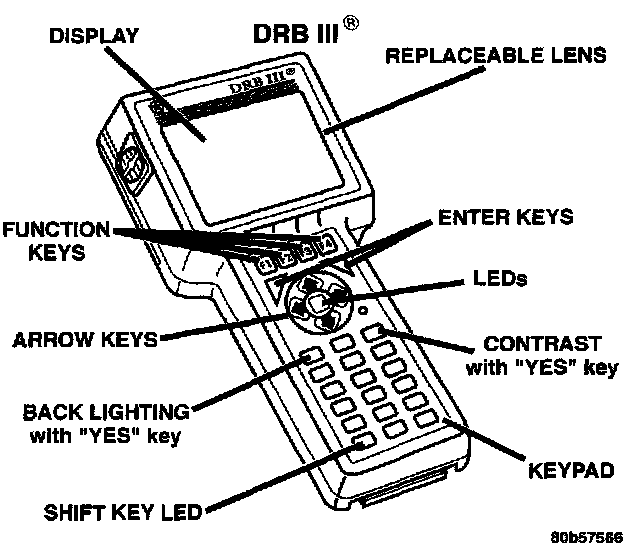
DISPLAY IS NOT VISIBLE
Low temperatures will affect the visibility of the display. Adjust the contrast to compensate for this condition.