Navigation Module: Service and Repair
Navigation System Traffic Module
Removal
1 Disconnect the battery ground cable. For additional information, refer to Specifications
2 Remove the access panel from the loadspace trim panel LH.
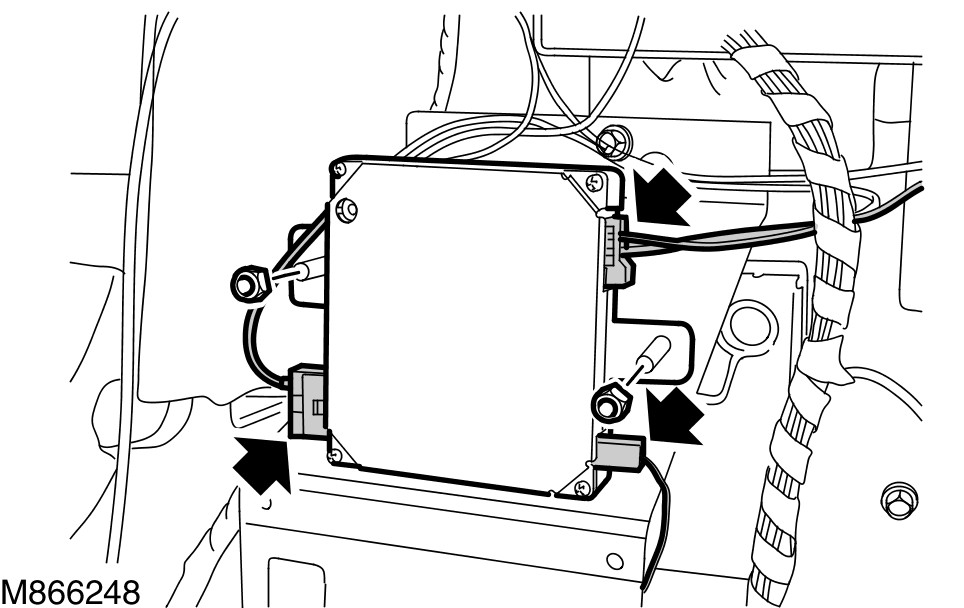
3
CAUTION: Cover fiber optic cable connectors to minimize dust ingress and avoid bending the cables in a radius of less than 30 mm.
Disconnect the navigation system traffic module optical connector.
4 Disconnect the navigation system traffic module coaxial cable connector.
5 Disconnect the navigation system traffic module electrical connector.
6 Remove the navigation system traffic module.
- Remove the 2 nuts.
Installation
1 Install the navigation system traffic module.
- Tighten the 2 nuts to 10 Nm (7 lb.ft).
2 Connect the navigation system module optical connector.
3 Connect the navigation system traffic module coaxial cable connector.
4 Connect the navigation system traffic module electrical connector.
5 Install the access panel to the loadspace trim panel LH.
6 Connect the battery ground cable. For additional information, refer to Specifications
7 Using the Land Rover approved diagnostic system, follow the on-screen instructions and configure the navigation system traffic module.