Test B: Front Electronic Module (Fem) Does Not Respond To NGS Tester
- Turn ignition switch to LOCK position. Disconnect FEM harness connector C201c, located behind driver's side kick panel. Disconnect NGS tester (if connected). Inspect FEM harness connector for loose, damaged or corroded terminals. If problem exists, repair harness connector as necessary and retest system for normal operation. If problem does not exist, go to next step.
- Connect FEM harness connector C201c and connect NGS tester. Turn ignition switch to RUN position. Perform data link diagnostic test. See DATA LINK DIAGNOSTIC TEST
under SELF-DIAGNOSTIC SYSTEM. If NGS tester indicates FEM: NO RESPONSE ON CKT 914 (BUS +), go to next step. If NGS tester indicates FEM: NO RESPONSE ON CKT 915 (BUS -), go to step 9
.
- Turn ignition switch to LOCK position. Disconnect FEM harness connector C201c. Disconnect NGS tester. Measure resistance between terminal No. 7 (Gray wire) at FEM harness connector C201c and terminal No. 2 (Gray/Red wire) at Data Link Connector (DLC). See Figure
and Fig 1
. If resistance is greater than 5 ohms, go to next step. If resistance is 5 ohms or less, replace FEM and retest system for normal operation.
- Disconnect Auxiliary Junction Box (AJB) harness connector C283c, located behind left side of instrument panel. See Figure
. Inspect harness connector for loose, damaged or corroded terminals. If problem does not exist, go to next step. If problem exists, repair harness connector as necessary and retest system for normal operation.
- Measure resistance in Gray wire between terminal No. 10 at AJB harness connector C283c and terminal No. 7 at FEM harness connector C201c. See Figure
and Fig 1
. If resistance is 5 ohms or less, go to next step. If resistance is greater than 5 ohms, repair open in Gray wire between AJB and FEM. Retest system for normal operation.
- Disconnect AJB harness connector C283d, located behind left side of instrument panel. See Figure
. Measure resistance between terminal No. 10 at AJB connector C283c and terminal No. 16 at AJB connector C283d (component side). See Figure
. If resistance is 5 ohms or less, go to next step. If resistance is greater than 5 ohms, replace AJB and retest system for normal operation.
- Disconnect joint connector No. 4 harness connector C223, located behind left side of instrument panel. Measure resistance in Gray wire between terminal No. 12 at joint connector No. 4 harness connector C223 and terminal No. 16 at AJB harness connector C283d. See Figure
and Figure
. If resistance is 5 ohms or less, go to next step. If resistance is greater than 5 ohms, repair open in Gray wire between AJB and joint connector No. 4. Retest system for normal operation.
- Measure resistance between terminals No. 12 and 14 at joint connector No. 4 (component side). See Figure
. If resistance is 5 ohms or less, repair open in Gray/Red wire between joint connector No. 4 and DLC. Retest system for normal operation. If resistance is greater than 5 ohms, replace joint connector No. 4 and retest system for normal operation.
- Turn ignition switch to LOCK position. Disconnect FEM harness connector C201c. Disconnect NGS tester. Measure resistance between terminal No. 1 (Blue wire) at FEM harness connector C201c and terminal No. 10 (Blue/Red wire) at Data Link Connector (DLC). See Figure
and Fig 1
. If resistance is greater than 5 ohms, go to next step. If resistance is 5 ohms or less, replace FEM and retest system for normal operation.
- Disconnect Auxiliary Junction Box (AJB) harness connector C283c, located behind left side of instrument panel. See Figure
. Inspect harness connector for loose, damaged or corroded terminals. If problem does not exist, go to next step. If problem exists, repair harness connector as necessary and retest system for normal operation.
- Measure resistance in Blue wire between terminal No. 8 at AJB harness connector C283c and terminal No. 1 at FEM harness connector C201c. See Figure
and Fig 1
. If resistance is 5 ohms or less, go to next step. If resistance is greater than 5 ohms, repair open in Blue wire between AJB and FEM. Retest system for normal operation.
- Disconnect AJB harness connector C283d, located behind left side of instrument panel. See Figure
. Measure resistance between terminal No. 8 at AJB connector C283c and terminal No. 12 at AJB connector C283d (component side). See Figure
. If resistance is 5 ohms or less, go to next step. If resistance is greater than 5 ohms, replace AJB and retest system for normal operation.
- Disconnect joint connector No. 4 harness connector C223, located behind left side of instrument panel. Measure resistance in Blue wire between terminal No. 11 at joint connector No. 4 harness connector C223 and terminal No. 12 at AJB harness connector C283d. See Figure
and Figure
. If resistance is 5 ohms or less, go to next step. If resistance is greater than 5 ohms, repair open in Blue wire between AJB and joint connector No. 4. Retest system for normal operation.
- Measure resistance between terminals No. 9 and 11 at joint connector No. 4 (component side). See Figure
. If resistance is 5 ohms or less, repair open in Blue/Red wire between joint connector No. 4 and DLC. Retest system for normal operation. If resistance is greater than 5 ohms, replace joint connector No. 4 and retest system for normal operation.
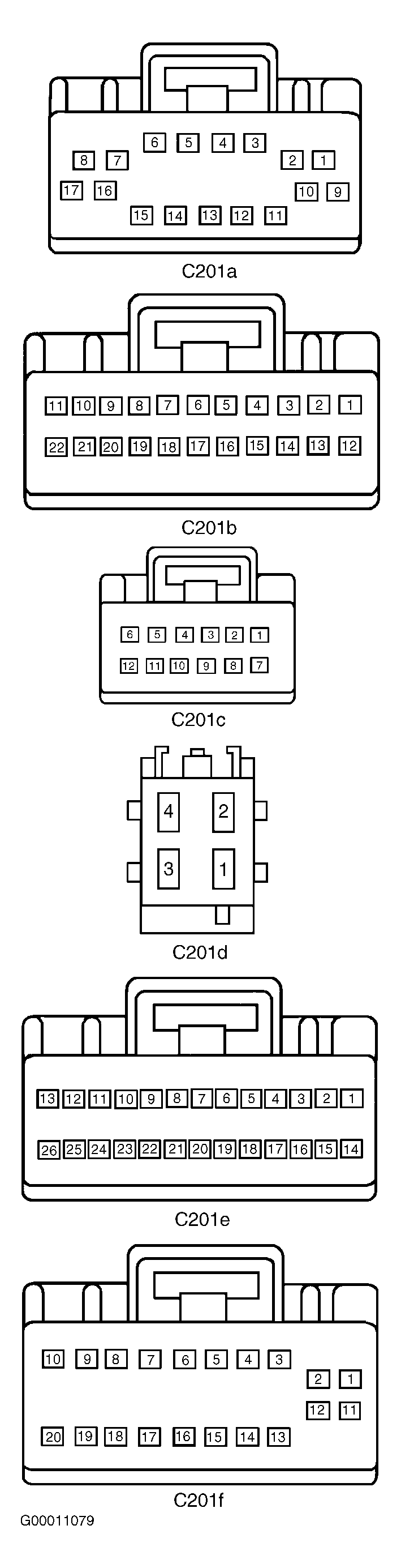 Courtesy of FORD MOTOR CO.