Removal And Installation
WARNING: This page is about a different car, the 2016 Ford Expedition. However, it is still accessible from the selected car via links, so may be relevant.
- 1.
NOTE:
This step is only necessary when installing a new component.
NOTE:
The PMI process must begin with the current DSM installed. If the current DSM does not respond to the diagnostic scan tool, the tool may prompt for As-Built Data as part of the repair.
Using a diagnostic scan tool, begin the PMI process for the DSM following the on-screen instructions.
- 2.
Position the driver seat forward (enough for DSM access) and to the full upward position.
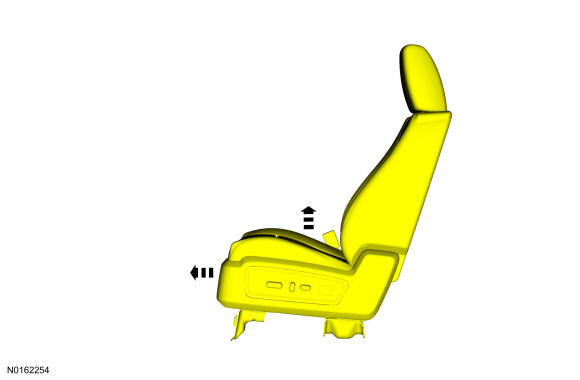 Courtesy of FORD MOTOR COMPANY Courtesy of FORD MOTOR COMPANY
|
- 3.
Disconnect the DSM electrical connectors.
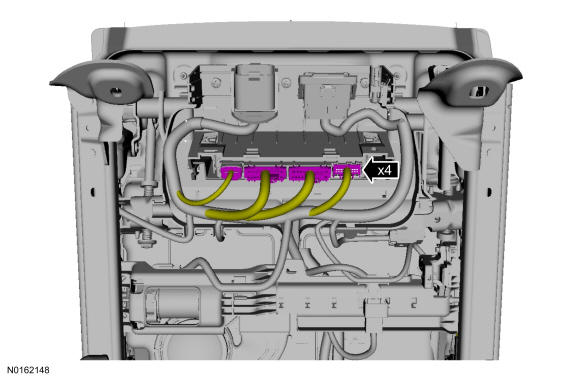 Courtesy of FORD MOTOR COMPANY Courtesy of FORD MOTOR COMPANY
|
- 4.
Release the locking tabs and remove the DSM.
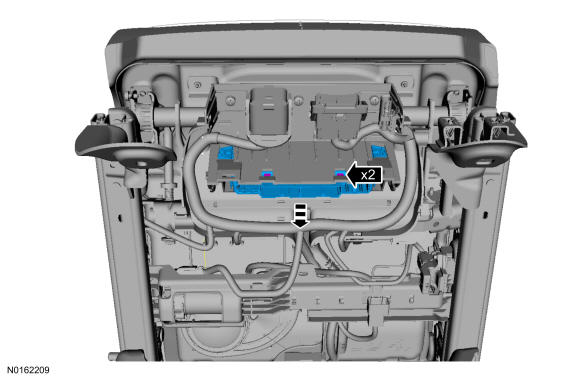 Courtesy of FORD MOTOR COMPANY Courtesy of FORD MOTOR COMPANY
|
- 5.
To install, reverse the removal procedure.
- 6.
NOTE:
This step is only necessary when installing a new component.
Using a diagnostic scan tool, complete the PMI process for the DSM following the on-screen instructions.
- 7.
NOTE:
This step is only necessary when installing a new component.
Operate the seat in all directions through the full range of travel to set soft stops and avoid a premature stopping point occurrence after the vehicle is returned to the customer.