Central Processing Unit (CPU): 626
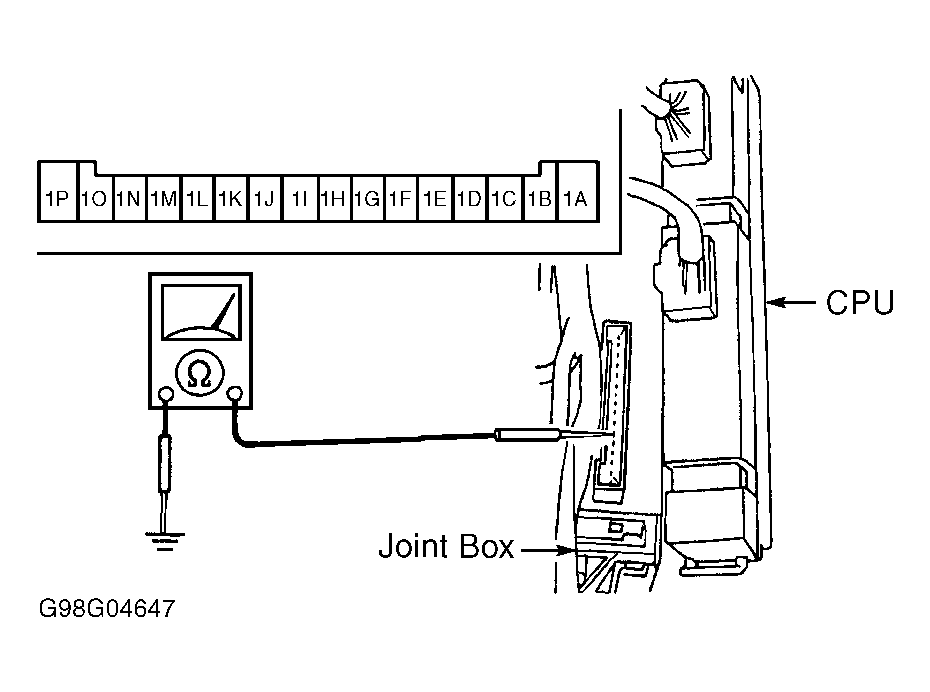
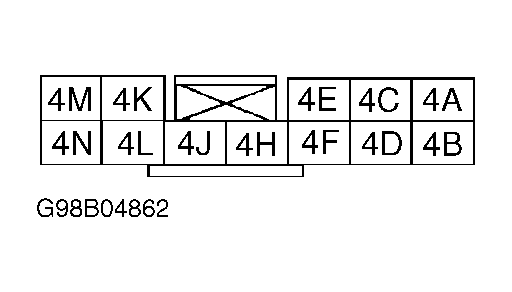
- Locate CPU unit behind left kick panel. Leave CPU connector attached. Using DVOM, measure voltage at specified terminals of CPU connector (backprobe connector). See Fig 1
through Fig 4
. See appropriate CPU CONNECTOR PIN VOLTAGES & CONTINUITY table. Disconnect CPU connector and check continuity at specified terminals.
- If voltage measurements or continuity are not as specified, check related components and wiring harnesses. If related components and wiring harnesses are okay, but system is still not functioning properly, replace CPU. See CENTRAL PROCESSING UNIT (CPU)
under REMOVAL & INSTALLATION.
 Courtesy of MAZDA MOTORS CORP.
 Courtesy of MAZDA MOTORS CORP.
 Courtesy of MAZDA MOTORS CORP.
 Courtesy of MAZDA MOTORS CORP.
 CPU CONNECTOR PIN VOLTAGES & CONTINUITY (CONNECTOR NO. 1)
| Terminal |
Specification Or Condition |
| 1A (Trunk Light Switch) |
| Trunk Open |
Battery Voltage |
| Trunk Closed |
No Voltage |
| 1B (Key Reminder Switch) |
| Key Inserted |
No Voltage |
| Key Removed |
Battery Voltage |
| 1C (15-Amp RADIO Fuse) |
| ACC Or ON Position |
Battery Voltage |
| LOCK Position |
No Voltage |
| 1D (Brake Warning Light), Ignition On |
| Brake Fluid Level Below MIN |
No Voltage |
| Brake Fluid Level Above MIN |
Battery Voltage |
| 1E (Rear Defroster Light), Ignition On |
| ON Position |
Battery Voltage |
| ACC Or LOCK Position |
No Voltage |
| 1F (Interior Light) |
| Switch In DOOR Position |
Battery Voltage |
| Switch In ON Or OFF Position |
No Voltage |
| 1G (CPU Ground), Constant |
Continuity |
| 1H (Door Ajar Light) |
| ON Position |
Battery Voltage |
| ACC Or LOCK Position |
No Voltage |
| 1I (Door Switch) |
| All Doors Closed |
No Continuity |
| Any Door Open |
Continuity |
| 1J (15-Amp ROOM Fuse), Constant |
Battery Voltage |
| 1K (Door Lock Switch) |
| Locked Or Unlocked |
Continuity |
| Released |
No Continuity |
| 1L |
Not Used |
| 1M (10-Amp METER Fuse) |
| ON Position |
Battery Voltage |
| ACC Or LOCK Position |
No Voltage |
| 1N (Rear Defroster Switch) |
| Switch Pushed |
Continuity |
| Switch Released |
No Continuity |
| 1O (Seat Belt Light/Buckle Switch), Ignition On |
| Driver's Belt Buckled |
Battery Voltage |
| Driver's Belt Unbuckled |
No Voltage |
| 1P (Parking Brake Switch) |
| Parking Brake On |
Battery Voltage |
| Parking Brake Released |
No Voltage |
CPU CONNECTOR PIN VOLTAGES & CONTINUITY (CONNECTOR NO. 2)
| Terminal |
Specification Or Condition |
| 2A (Horn Relay/Horn Switch) |
| Horn Off |
Battery Voltage |
| Horn On |
No Voltage |
| 2B (Door Lock Timer Unit 1 - Door Lock) |
| While Pressing Switch |
|
| Other |
Battery Voltage |
| 2C (Security Light) |
| Light Off |
Battery Voltage |
| Light On |
No Voltage |
| 2D (Door Lock Timer Unit 2 - Trunk Unlock) |
| While Pressing Switch |
|
| Other |
Battery Voltage |
| 2E (Flasher Unit) |
| Hazard Switch Off |
Battery Voltage |
| Hazard Switch On |
No Voltage |
| 2F (Door Lock Timer Unit 2 - Driver's Door Unlock) |
| While Pressing Switch |
|
| Other |
Battery Voltage |
| 2G |
Not Used |
| 2H (Door Lock Timer Unit 1 - Door Unlock) |
| While Pressing Switch |
|
| Other |
Battery Voltage |
| 2I |
Not Used |
| 2J (Trunk Key Cylinder Switch) |
| Unlocked |
No Voltage |
| Other |
5 Volts |
| 2K |
Not Used |
| 2L |
Not Used |
| 2M |
Not Used |
| 2N |
Not Used |
| 2O (Keyless Unit) |
| 0.3 Sec. After LOCK Pressed |
3.5 Volts |
| 0.3 Sec. After UNLOCK Pressed |
1.7 Volts |
| 0.3 Sec. After TRUNK Pressed |
No Voltage |
| Other |
5 Volts |
| 2P |
Not Used |
CPU CONNECTOR PIN VOLTAGES & CONTINUITY (CONNECTOR NO. 3)
| Terminal |
Specification Or Condition |
| 3A (Headlight Relay) |
| Headlight Switch (2nd Position) |
No Voltage |
Headlight
Switch (OFF or 1st Position) |
Battery Voltage |
| 3B (Headlight Switch) |
| Headlight Switch (2nd Position) |
No Voltage |
Headlight
Switch (OFF or 1st Position) |
5 Volts |
| 3C (Hood Switch) |
| Hood Closed |
5 Volts |
| Hood Open |
No Voltage |
| 3D |
Not Used |
| 3F (Rear Defroster Relay), Ignition On |
| Switch On |
No Voltage |
| Other |
Battery Voltage |
| 3H |
Not Used |
| 3I (Headlight Switch/TNS) |
| Headlight Switch Off |
5 Volts |
| Headlight Switch In Park Or On Position |
No Voltage |
| 3J (TNS Relay) |
| Headlight Switch Off |
Battery Voltage |
| Headlight Switch In Park Or On Position |
No Voltage |
CPU CONNECTOR PIN VOLTAGES & CONTINUITY (CONNECTOR NO. 4)
| Terminal |
Specification Or Condition |
| 4A (Left Headlight - Headlights On) |
| Dimmer At Low |
No Voltage |
| Dimmer At High |
Battery Voltage |
| 4B (CPU Ground), Constant |
Continuity |
| 4C (Right Headlight - Headlights On) |
| Dimmer At Low |
No Voltage |
| Dimmer At High |
Battery Voltage |
| 4D (CPU Ground), Constant |
Continuity |
| 4E (Headlight Relay) |
| Headlight Switch At 2nd Position |
No Voltage |
Headlight
Switch OFF Or 1st Position |
Battery Voltage |
| 4F (Headlight Switch) |
| Headlight Switch At 2nd Position |
No Voltage |
Headlight
Switch OFF Or 1st Position |
5 Volts |
| 4H (High Beam Switch) |
| Dimmer At Low |
5 Volts |
| Dimmer At High |
No Voltage |
| 4J (Rear Defroster Relay), Ignition On |
| Switch On |
No Voltage |
| Other |
Battery Voltage |
| 4K (Headlight High Relay - Headlights On) |
| Dimmer At Low |
Battery Voltage |
| Dimmer At High |
No Voltage |
| 4L |
Not Used |
| 4M (Headlight Switch/TNS) |
| Headlight Switch Off |
5 Volts |
| Headlight Switch In 1st Or 2nd Position |
No Voltage |
| 4N (TNS Relay) |
| Headlight Switch Off |
Battery Voltage |
| Headlight Switch In 1st Or 2nd Position |
No Voltage |