Clearing DTC [BCM]
CLEARING DTC [BCM]
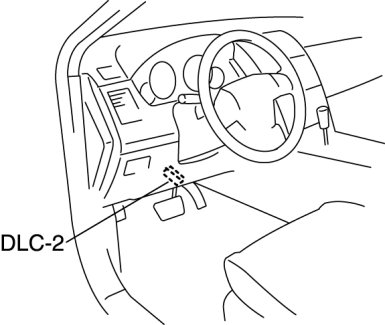
1. Connect the M-MDS to the DLC-2.
2. After the vehicle is identified, select the following items from the initialization screen of the M-MDS.
- When using the IDS (laptop PC)
1 Select "Self Test".
2 Select "Modules".
3 Select "GEM".
- When using the PDS (Pocket PC)
1 Select "Module Tests".
2 Select "GEM".
3 Select "Self Test".
3. Verify the DTC according to the directions on the screen.
4. Press the clear button on the DTC screen to clear the DTC.
5. Turn the ignition switch to the LOCK position.
6. Turn the ignition switch to the ON position and wait for 5 s more.
7. Perform DTC inspection. DTC Inspection [BCM]
8. Verify that no DTCs are displayed.