DTC Inspection [BCM]
DTC INSPECTION [BCM]
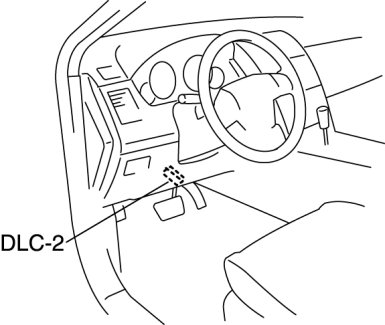
1. Connect the M-MDS to the DLC-2.
2. Verify the following vehicle conditions:
- All the switches are turned off (except the ignition switch).
- All the doors, bonnet, and liftgate are closed.
- All the doors, and liftgate are unlocked.
- All the seat belts are unbuckled.
- Parking brake lever is pulled.
3. Start the engine.
NOTE:
- If the engine is not running, the BCM determines that the oil pressure switch malfunction.
4. After the vehicle is identified, select the following items from the initialization screen of the M-MDS.
- When using the IDS (laptop PC)
1 Select "Self Test".
2 Select "Modules".
3 Select "GEM".
- When using the PDS (Pocket PC)
1 Select "Module Tests".
2 Select "GEM".
3 Select "Self Test".
5. Verify the DTC according to the directions on the screen.
- If any DTCs are displayed, perform troubleshooting according to the corresponding DTC inspection.
6. After completion of repairs, clear all DTCs stored in the BCM. Clearing DTC [BCM]