Communication Interface Module Microphone Replacement
Communication Interface Module Microphone Replacement
Removal Procedure
Caution: Refer to Battery Disconnect Caution (Battery Disconnect Caution) .
1. Disconnect the battery ground cable. Refer to Battery Negative Cable Disconnection and Connection (Service and Repair) .
2. Remove the front dome lamp assembly. Refer to Dome Lamp Replacement (Service and Repair) .
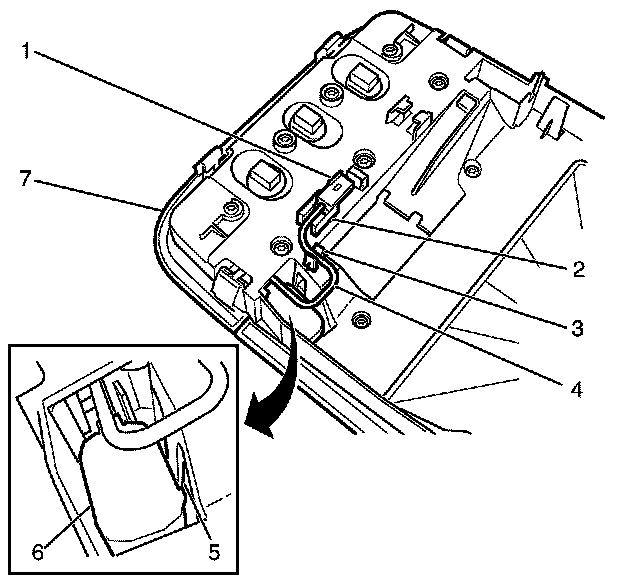
3. Detach the microphone connecter (1) from the retainer (2).
4. Detach the microphone harness (4) from the retainer (3).
Important: Care should be taken not to damage the microphone retainer (5)
Important: Slide the microphone (6) towards the microphone retainer (5) and lift the microphone (6) away from the dome lamp assembly (7).
5. Apply suitable pressure to the microphone retainer (5) away from the microphone (6).
6. Remove the microphone (6) from the dome lamp assembly (7).
Installation Procedure
Important: Listen for an audible click to confirm correct installation of the microphone (6) to the dome lamp assembly (7).
1. Install the microphone (6) to the dome lamp assembly (7).
2. Attach the microphone harness (4) to the retainer (3).
3. Attach the microphone connecter (1) to the retainer (2).
4. Install the front dome lamp assembly. Refer to Dome Lamp Replacement (Service and Repair)
5. Connect the battery ground cable. Refer to Battery Negative Cable Disconnection and Connection (Service and Repair) .