Communication Interface Module Bracket Replacement
Communication Interface Module Bracket Replacement
Removal Procedure
1. Remove the vehicle communication interface module (VCIM). Refer to Communication Interface Module Replacement (Communication Interface Module Replacement).
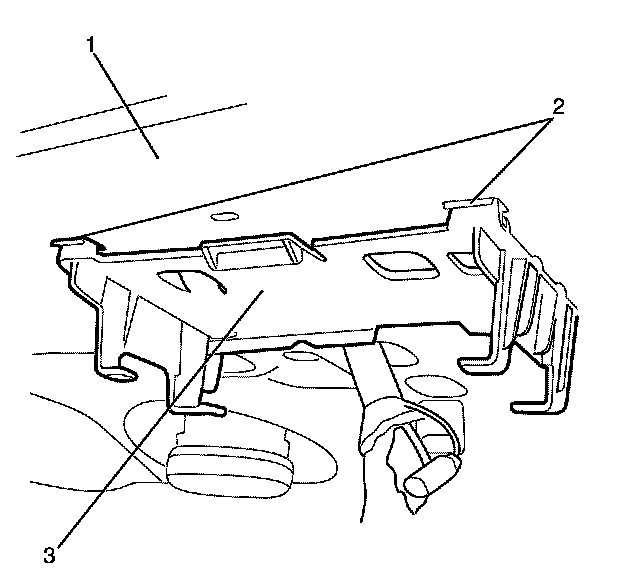
2. Disengage the VCIM bracket to body retaining clips (2).
3. Lower the rear end of the VCIM bracket (3) away from the body (1).
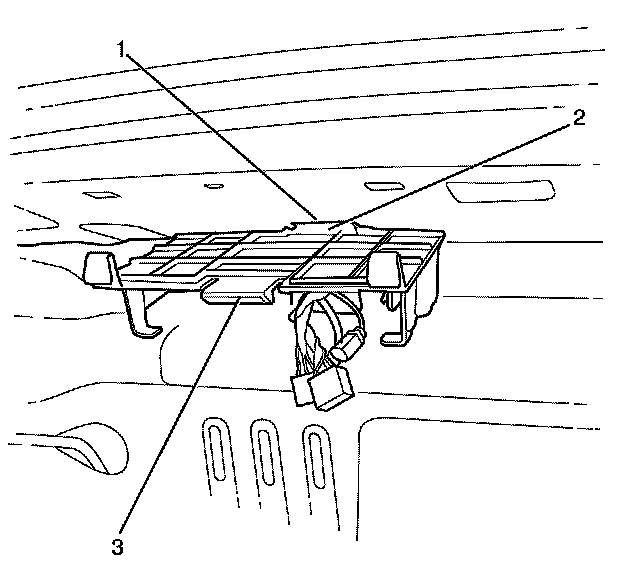
4. Slide the VCIM bracket retainer (2) out of the body slot (1).
5. Remove the VCIM bracket (3) from the vehicle.
Installation Procedure
1. Install the VCIM bracket (3) to the vehicle.
2. Slide the VCIM bracket retainer (2) into the body slot (1).
Notice: Listen for an audible click to confirm correct installation of the VCIM bracket to body retaining clips (2).
3. Apply suitable upward pressure to the VCIM bracket (3) to engage the VCIM bracket to body retaining clips (2) to the body (1).
4. Install the VCIM. Refer to Communication Interface Module Replacement (Communication Interface Module Replacement).