Read O2 Sensor Monitoring Test Results Data (OBD Mode)
1. On the [Main Menu] display screen, select the {Each System Check} and press the [YES] key.2. On the [System Selection Menu] display screen, select the {Engine Control System} and press the [YES] key.
3. Press the [YES] key after displayed the information of engine type.
4. On the [Engine Diagnosis] display screen, select the {OBD System} and press the [YES] key.
5. On the [OBD Menu] display screen, select the {O2 Sensor Monitor} and press the [YES] key.
6. On the [O2 Sensor Select] display screen, select the {Bank 1 - Sensor} or {Bank 1 -Sensor2} and press the [YES] key.
- Bank 1-Sensor 1 indicates the front oxygen or A/F sensor, and Bank 1-Sensor2 indicates the rear oxygen sensor.
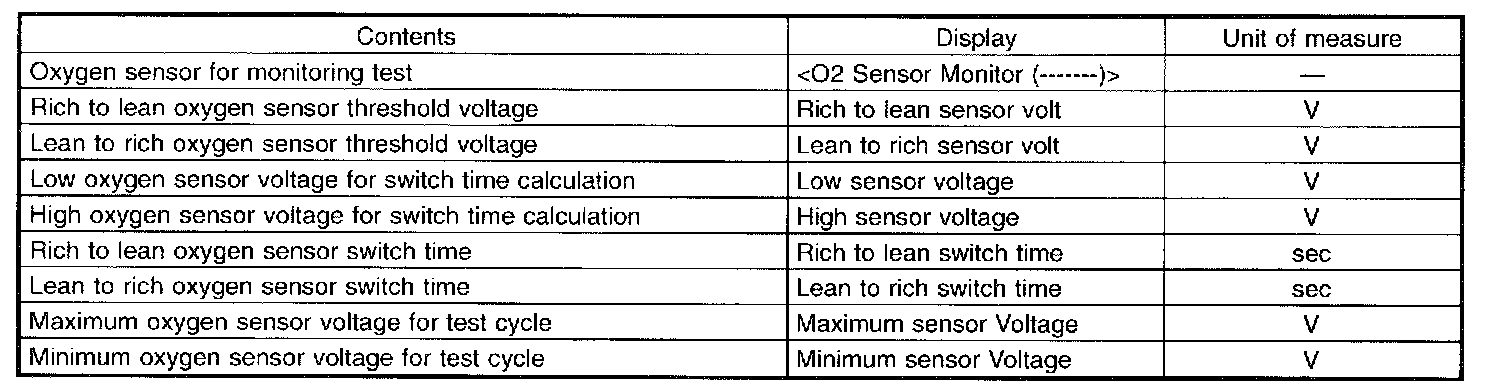
A list of the support data is shown in the table.
NOTE: For detailed operation procedure, Refer to the SUBARU SELECT MONITOR OPERATION MANUAL.