No. 4 Programming Procedure Due to Keyless Control Module Replacement: Procedure
WARNING: This page is about a different car, the 2009 Mazda 6. However, it is still accessible from the selected car via links, so may be relevant.
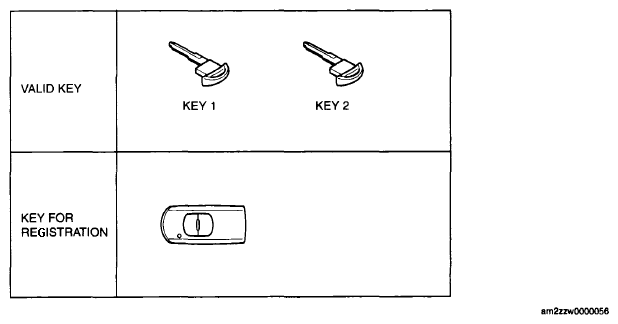 Courtesy of MAZDA MOTORS CORP.
| Step |
Procedure |
Action after procedure |
| 1 |
REPLACE KEYLESS CONTROL MODULE
Refer to keyless control module removal/installation for the keyless control module replacement and configuration. (See
KEYLESS CONTROL MODULE REMOVAL/INSTALLATION [ADVANCED KEYLESS ENTRY AND PUSH BUTTON START SYSTEM] .) (See
KEYLESS CONTROL MODULE CONFIGURATION [ADVANCED KEYLESS ENTRY AND PUSH BUTTON START SYSTEM] ) |
Go to the next step. |
| 2 |
PERFORM PARAMETER RESET
- Connect the M-MDS to the DLC-2
(See
M-MDS CONNECTING PROCEDURE )
- Remove the valid keys or valid advanced keys from the vehicle (keep them 1 m or more from the vehicle), and switch the ignition on according to the directions on the M-MDS screen. Select, "There is no programmed ignition key and programmed advanced key" from the M-MDS screen
CAUTION:
- Because the ignition is switched on using "Special Service Mode", the engine cannot be started during this IG cycle.
- The security light or the keyless warning light (red) illuminates or flashes, this does not indicate an improper procedure. Continue to perform the procedure as indicated.
NOTE:
- Although the security light starts flashing and DTC 15 is displayed after approx. 1 min
, this does not indicate an improper procedure. Continue to perform the procedure as indicated.
- After the vehicle is identified, select the following items from the initialization screen of the M-MDS.
- Using an IDS (laptop PC)
- Select "Body"
- Select "Security"
- Select "PATS Functions"
- Using a PDS (Pocket PC)
- Select "All Tests and Calibrations"
- Select "PATS Functions"
- Then, select an item from the screen menu
Item
- Perform the security access according to the directions on the M-MDS screen.
- Select the replaced parts "RKE" according to the directions on the M-MDS screen.
CAUTION:
- At this time, do not select the other parts from the M-MDS menu.
|
Go to the next step. |
| 3 |
CLEAR IGNITION KEY ID NUMBERS
- Select "Ignition Key Code Erase and Program" from the M-MDS screen menu.
- Clear the ignition key code according to the directions on the M-MDS.
|
Go to the next step |
| 4 |
PERFORM IGNITION KEY ID NUMBER PROGRAMMING
- Program two keys according to the directions on the M-MDS
- Verify that the PATS function menu is displayed again on the M-MDS screen.
|
Go to the next step. |
| 5 |
PERFORM ADVANCED KEY PROGRAMMING
- Select "Program Additional Ignition Key" from the M-MDS screen menu.
- Program the advanced key according to the directions on the M-MDS.
- Verify that the PATS function menu is displayed again on the M-MDS screen.
|
Go to the next step. |
| 6 |
PERFORM STEERING LOCK UNIT PROGRAMMING
- Select "Steering Lock Unit Programming" from the M-MDS screen menu.
- Complete the steering lock unit programming according to the directions on the M-MDS (See
STEERING LOCK UNIT ID CODE REGISTRATION [ADVANCED KEYLESS ENTRY AND PUSH BUTTON START SYSTEM] )
- After verifying that the PATS function menu is displayed again on the M-MDS screen, select "Finish (this menu)"
- Switch the ignition off
- Disconnect the M-MDS from the DLC-2
- Remove the programmed card key from the vehicle.
|
Go to the next step |
| 7 |
ESTABLISH THE IMMOBILIZER SYSTEM WITH KEY 1
NOTE:
- By starting the engine, the immobilizer system is established and key programming is finished
- Start the engine using key 1
- Verify that the security light and keyless warning light operate as shown in the following figure.
- Switch the ignition off and remove key 1
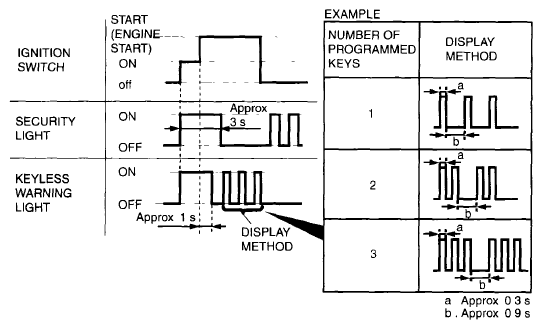 Courtesy of MAZDA MOTORS CORP. Courtesy of MAZDA MOTORS CORP.
|
Go to the next step. |
| 8 |
VERIFY THAT ANY KEY IS PROGRAMMED.
- Start the engine using key 2
- Verify that the security light and keyless warning light operate as shown in the following figure
- Switch the ignition off and remove key 2
- Are there other keys to be programmed?
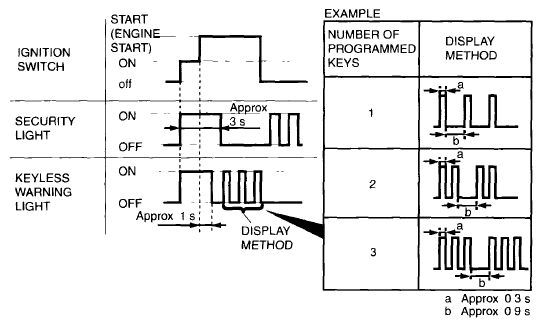 Courtesy of MAZDA MOTORS CORP. Courtesy of MAZDA MOTORS CORP.
|
Yes |
Repeat Step 8 using each programmed key. |
| No |
Go to the next step. |
| 9 |
VERIFY THAT ANY ADVANCED KEY IS PROGRAMMED.
- Bring the programmed advanced key into the vehicle.
- Close all doors
- Remove the key from the key slot and place it on the front passenger's seat.
- Start the engine using the advanced key.
- Verify that the security light and keyless warning light operate as shown in the following figure.
- After verifying that the keyless warning light turns off, switch the ignition off.
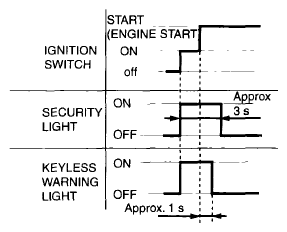 Courtesy of MAZDA MOTORS CORP. Courtesy of MAZDA MOTORS CORP.
|
Procedure is completed |